Why eclipse glasses still matter, even for short viewing
It’s tempting to assume a quick glance is harmless, especially if the Sun looks dim through haze or you’re only stepping outside for a minute. The risk is that your eye can’t reliably signal danger here: the retina doesn’t feel pain the way skin does, and damage can happen before you realize anything is wrong. Outside the brief window of totality (only in a narrow path, and only for a few minutes), the Sun is still bright enough to injure vision. Good eclipse glasses are the simplest control—cheap, portable, and more dependable than trying to “time it” safely.
Do you actually need new eclipse glasses this time?
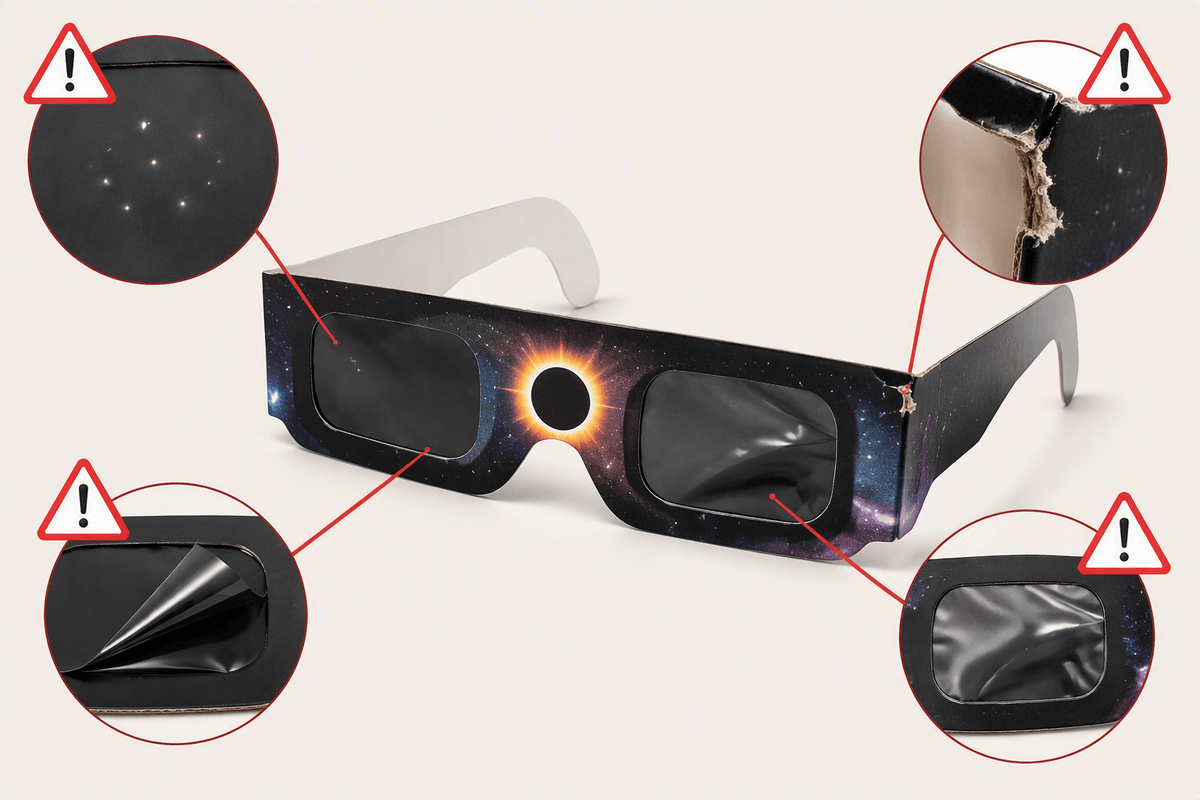
You only need new eclipse glasses if you can’t trust the pair you already have. Unlike sunscreen, properly made solar filters don’t “expire” on a calendar. What matters is condition and provenance: were they bought from a reputable source, and have they been stored flat, clean, and unbent (not rattling around in a car glovebox or a classroom bin)? Before eclipse day, inspect them in bright indoor light. If you see scratches, pinholes, creases, warped lenses, loosened filters, or any tearing at the frames, replace them. If the glasses have no manufacturer name, no ISO 12312-2 reference, or they came from a random marketplace listing with vague branding, treat them as unverified and buy new.
If you’re viewing with kids or a group, replacing borderline pairs is usually the cheaper choice compared with the risk and the hassle of monitoring everyone’s use minute by minute.
What ‘ISO-certified’ really means (and what it doesn’t)
You’ll see “ISO 12312-2” printed on many eclipse glasses. That’s the international standard for filters intended for direct viewing of the Sun, and it’s a useful baseline: a legitimate product should name the standard, identify the manufacturer (or responsible seller), and be traceable to a real company. In practice, “ISO-certified” on the listing is not proof by itself. Sellers can print the number on cardboard, copy it into product photos, or describe “ISO compliant” without any meaningful quality control behind it.
Think of ISO 12312-2 as a requirement, not a guarantee. It doesn’t tell you the glasses were independently tested for every batch you’re buying, or that the seller stored them correctly, or that they’ll arrive undamaged. It also doesn’t cover fit on small faces or safe use with binoculars and telescopes (which need dedicated solar filters). Treat the ISO mark as step one, then verify the source and inspect the pair you receive.
Fast ways to spot fakes before you buy
You’ve probably seen the same glasses image used across dozens of listings, with minor name changes and big promises like “NASA approved” or “certified safe by the government.” Treat those as warning signs. A legitimate listing should show the actual printed markings on the product (not just a badge graphic): ISO 12312-2, a manufacturer or brand name, and some way to trace it (company site, contact info, or a model name that returns consistent results when you search it). If the seller can’t tell you who made the filters, you can’t verify anything.
Scan for “too good to be true” patterns: bulk packs priced far below normal, generic titles stuffed with keywords, or reviews that talk about shipping speed but never mention clarity, fit, or markings. Avoid listings that hide the brand in the fine print, show blurred photos of the lens text, or swap product photos between colors/styles. Even when the listing looks right, budget time and money for replacements—fast shipping doesn’t help if the glasses arrive creased, scratched, or unmarked.
Where to buy safely when time is running out
You can’t “inspect your way out” of a bad supply chain at the last minute, so prioritize sellers that control inventory and returns. Local science museums, planetariums, observatories, university outreach offices, and library systems often distribute or sell verified glasses close to eclipse day, and you can check markings in person before paying. Camera stores and reputable telescope retailers are another strong bet because they already handle optical safety products and usually list the manufacturer clearly.
If you must buy online, favor established astronomy retailers or the manufacturer’s own storefront, and pay for tracking so you can react if the shipment slips. Skip third-party marketplace listings that mix multiple suppliers under one product page; even a good photo can be replaced by a different batch. The practical trade-off is cost and availability: safer channels may be a few dollars more per pair and can sell out early, but they reduce the odds you’re scrambling with unverified glasses the night before.
Getting the fit and usage right on eclipse day
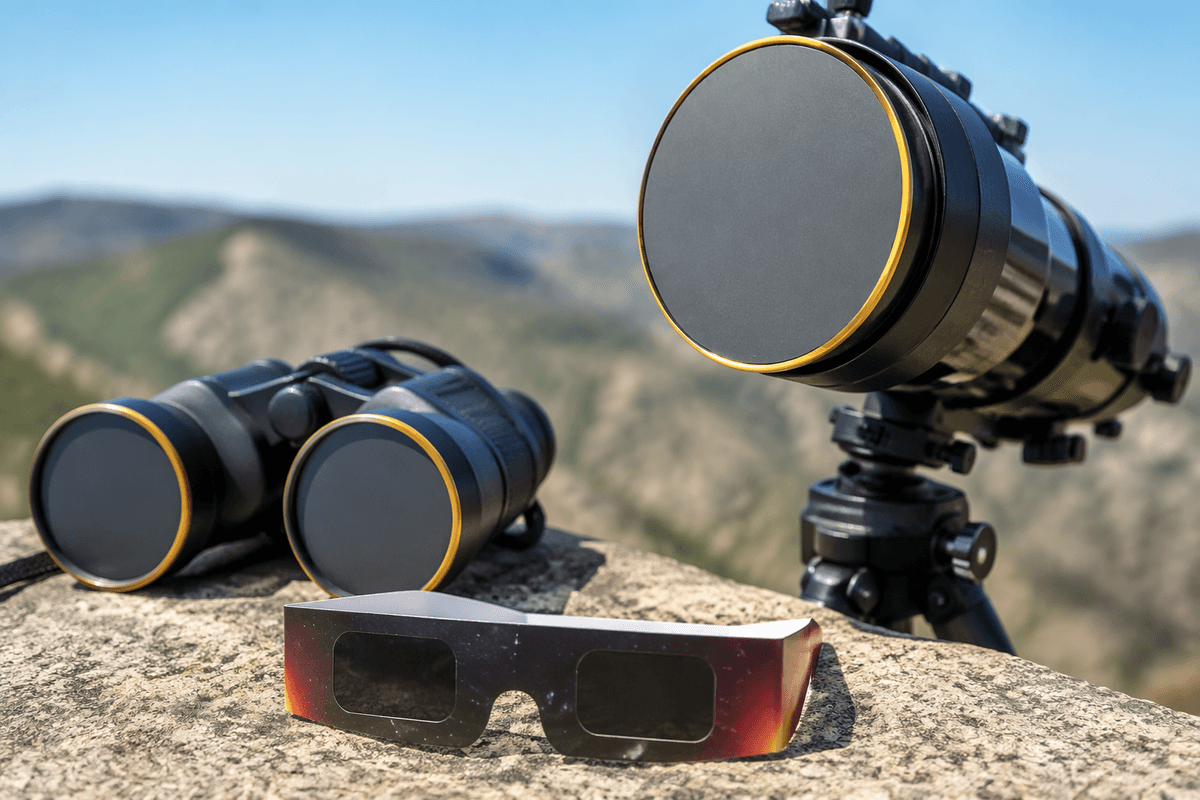
The most common eclipse-day failure isn’t “wrong standard,” it’s poor fit or sloppy handling. Put the glasses on before you face the Sun, then keep them on while you look up. If you need to adjust them, turn away first. With kids, do a quick “mask check”: frames sit flat on the nose, no big gaps at the cheeks, and the child can’t peek around the lenses. If the glasses slide, use a simple strap, tape the arms lightly, or choose a smaller-size pair; don’t rely on a child holding them in place by hand.
Do one last inspection outside: the Sun should appear comfortably dim (a small, bright disc, not a glare that makes you squint). If you notice new scratches, a bent lens, loose filters, or any light leaks, retire that pair. Keep glasses clean and dry, and never use eclipse glasses with binoculars, telescopes, or cameras unless those devices have proper front-mounted solar filters.
No glasses available? Safe viewing alternatives that still work
You may still be able to watch safely without eclipse glasses, but only if you switch methods rather than improvising. The simplest option is projection: make a pinhole projector (a small hole in a piece of cardboard casting the Sun onto a second sheet) or use a colander, leaf canopy, or even overlapping fingers to project crescent shapes onto the ground. For groups, a “box projector” (a shoebox with a pinhole and a white screen inside) costs little and keeps kids from trying to look up.
If you have binoculars or a telescope, don’t use them for direct viewing without a proper front-mounted solar filter made for that exact instrument; improvised filters can fail suddenly. Another practical constraint: projection needs space and patience—images are dim in shade and wind can shake the setup—so do a quick test the day before and plan a backup spot with good sunlight.
A simple last-minute checklist to buy and use confidently
You’re ready if you can answer “yes” to these: your glasses are from a traceable maker/seller (not a generic marketplace mashup); the frames or insert clearly show “ISO 12312-2” plus a real brand/manufacturer; and each pair passes a bright-light inspection (no scratches, pinholes, creases, loose film, or warping). If buying now, choose in-person sources (museum, library, observatory, camera/telescope shop) or a known astronomy retailer, and budget extra for shipping delays and replacements.
On eclipse day: put glasses on before looking up, turn away to adjust, and do a quick kid fit-check to prevent peeking. Never pair eclipse glasses with binoculars or a telescope; use proper front-mounted solar filters or switch to projection.